The important part is that you do not click the shooting star. Move your cursor into it when it appears and touch it to finish the challenge.
How to Beat The Impossible Quiz Question 84
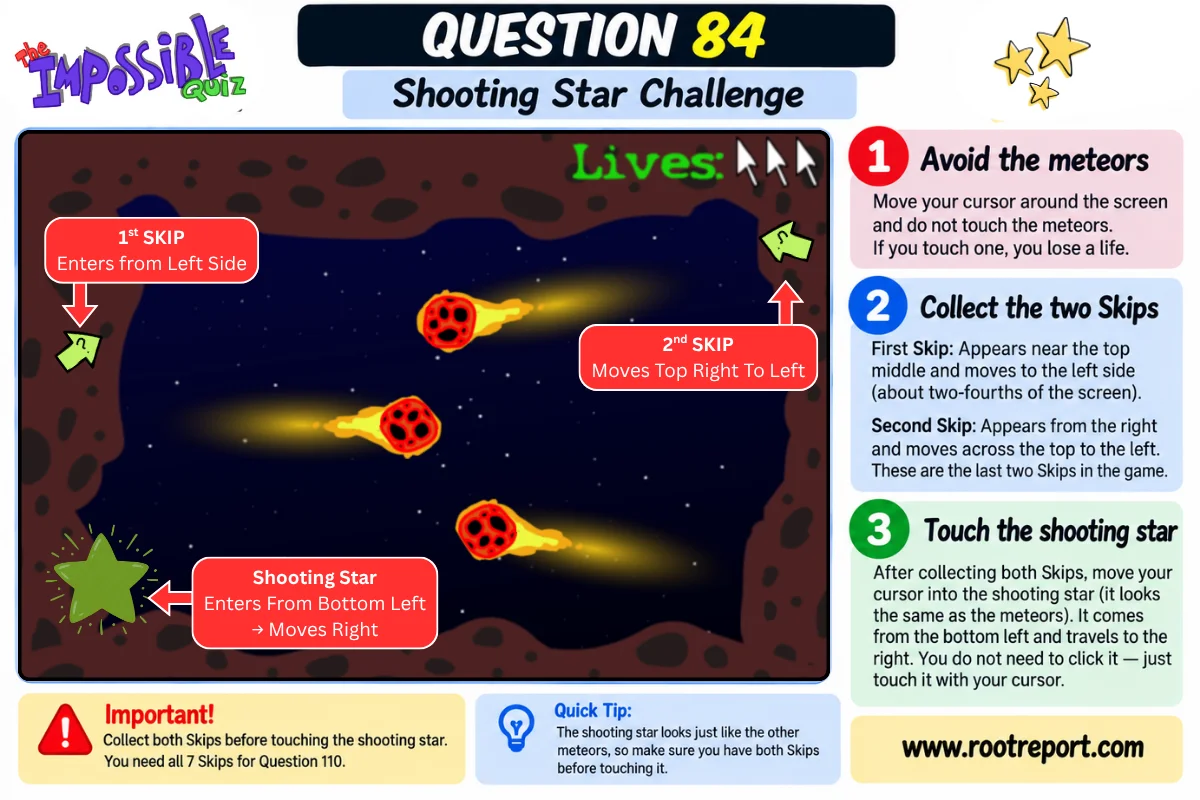
Step 1: Avoid the Meteors
You do not need to click anything during this part. Your goal is simply to keep your cursor safe until the important objects appear.
Step 2: Collect the First Skip
Move your cursor over the Skip to collect it while continuing to avoid the meteors.
Step 3: Collect the Second Skip
Touch it with your cursor to collect it. These are the last two Skips available in the original game, so do not finish Question 84 before collecting both.
Step 4: Touch the Shooting Star
It enters from the bottom-left and travels horizontally toward the right side of the screen. Move your cursor into its path and touch the shooting star.
You do not need to click it. Touching it completes the minigame and takes you to Question 85.
Question 84 Walkthrough: Quick Steps
- Enter the shooting-star minigame.
- Move around while avoiding the meteors.
- Collect the first Skip near the top-left.
- Collect the second Skip moving across the top of the screen.
- Wait for the shooting star to appear from the bottom-left.
- Move your cursor into the shooting star and touch it.
- Continue to Question 85.
Why Are the Skips So Important?
Five Skips are awarded earlier in the game, while the final two appear during this minigame. If you have saved every Skip so far, collecting both here gives you all 7 Skips needed for Question 110.
What If You Miss the Shooting Star?
Keep avoiding the meteors and wait for the star to appear again. You only need to touch it when it passes through your cursor.
More Impossible Quiz Answers
Need help with another difficult question? Check these detailed walkthroughs:
- Impossible Quiz Question 42 Answer: Which 42 to Click?
- Impossible Quiz Question 92 Answer: Descending Order Walkthrough
- Impossible Quiz Question 102 Answer: How to Touch All the Dots
- Impossible Quiz Question 103 Answer: Where to Find Dennis
- Impossible Quiz Question 106 Answer: How to Stay on the Road
- Impossible Quiz Question 110 Answer: How to Use All 7 Skips